AI has changed the way content creators work. Today, you can use AI to generate ideas, write content, create emails, generate images, conduct research, plan projects, and automate repetitive tasks.
For content creators, freelancers, coaches, designers, social media managers, and online business owners, AI can save hours of work. But there is one important thing we must not forget:
AI is here to help you, not to replace you.
And creators who fail to understand this difference may eventually fall behind. The goal shouldn’t be to let AI do everything for you. The real advantage comes from learning how to combine AI with your own knowledge, creativity, experience, and judgment.
AI Is Your Assistant, Not Your Replacement
Think of AI like Google Maps. Google Maps can give you directions. It can suggest a shortcut and help you find the fastest route. But who is driving the car?
You.
If you take the wrong turn, Google Maps may suggest another route, but you are still responsible for where you go. AI works similarly. It can give you ideas, suggestions, drafts, and possible solutions. But the final decision-and the responsibility for that decision-still belongs to you.
This is where many beginners make a mistake. They give AI a simple prompt, copy whatever it generates, and publish it without reviewing or improving it. That’s not really using AI intelligently. That’s simply outsourcing your thinking to AI.
How Successful Content Creators Use AI
The smarter approach is to divide your work into two categories:
What should AI help you with?
And:
What should you do yourself?
AI is excellent for speeding up repetitive tasks, generating possibilities, organizing information, creating first drafts, and helping you think through a problem. But your personal experience, expertise, judgment, creativity, and understanding of your audience are still extremely important.
Let’s look at a practical example.
Example: Creating a YouTube Channel Description
Imagine Naina wants to start a cooking YouTube channel. She needs a channel description.
A beginner might simply type:
“Write a description for my cooking channel.”
Then copy and paste the response.
Instead, Naina can give AI much better context. Before asking AI to write anything, she can explain:
- What her channel is about
- Her mission and vision
- Why she started the channel
- Her content style
- Her target audience
- Her goals
- Her expertise
- The type of videos she plans to create
The more relevant context she provides, the more useful the output can become. She can also study competitors and identify important keywords related to her niche.
For example, she could provide several competitor descriptions and manually select relevant keywords. Then she could ask AI to create a channel description using those references and keywords. Now AI isn’t randomly creating content. It is working with information provided by Naina.
That’s a much smarter way to use AI.
10 Ways Content Creators Can Use AI
AI can become incredibly useful when you use it as part of your workflow. Here are some practical areas where content creators and online business owners can use it.
- Target Audience Research
- Product Idea Generation
- Product Structure and Outlines
- Content Drafting
- Visual Planning
- Marketing Preparation
- Customer Support
- Operations and Workflows
- Learning and Research
1. Target Audience Research
One of the first challenges when starting an online business is understanding: Who am I creating content or products for?
Suppose you’ve written a book called 100 Healthy Salad Recipes. You might not know exactly who your ideal customer is. AI can help you brainstorm potential audiences, such as:
- People interested in weight loss
- Gym-goers
- Health-conscious professionals
- Parents looking for healthy meals
- People trying to improve their diet
But there’s an important second step.
Don’t blindly accept AI’s answer. Validate it.
Look at Facebook groups, Reddit communities, Instagram comments, forums, and other places where your potential audience actually talks about their problems.
AI can help you generate hypotheses. Real people help you validate them.
2. Product Idea Generation
AI can also help you brainstorm digital product ideas. For example, imagine you run a devotional YouTube channel and want to sell a digital product.
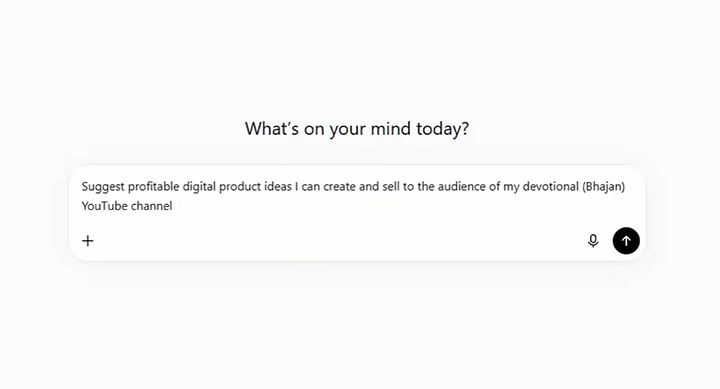
You don’t have to use every suggestion. The purpose is to expand your thinking and generate possibilities faster. You then decide which ideas actually make sense for your audience.
3. Product Structure and Outlines
AI is particularly useful when you know what you want to create but don’t know how to structure it.
For example, you can use AI to create:
- eBook Outline
- Course Module
- Planner
- Checklist
However, don’t blindly accept the entire structure. AI may include topics that are too basic, repetitive, or irrelevant to your audience. Review the outline and make the final decision yourself.
AI can suggest the structure. You should own the final structure.
4. Content Drafting
AI can help create first drafts for:
- Articles
- Caption
- Descriptions
- Script
But remember one rule: An AI-generated Output is draft.
Don’t publish it immediately. Add your: Experience or knowledge. Also check whether the writing sounds robotic or repetitive.
Most importantly, verify factual information before publishing. Your audience trusts you, not the AI tool.
5. Visual Planning
AI can also help creators plan visuals for thumbnails, social media posts, and other content. Instead of giving a vague prompt, provide specific information.
For example:
- What the content is about
- Who the audience is
- The visual style
- Important elements
- Text placement
- Icons or objects
- The emotional feeling you want
- The type of composition you want
You can also study successful content in your niche and identify patterns in their visual presentation. The goal isn’t to copy another creator.
It’s to understand what communicates effectively and then develop your own approach.
6. Marketing Preparation
AI can save significant time when preparing marketing materials. You can use it to draft: Sales draft or email writing.
But always review marketing claims carefully. AI can sometimes generate exaggerated or unrealistic promises.
For example, claims such as “double your money in one day” or “earn $200 every month guaranteed” should never be published simply because AI suggested them.
You are responsible for what you promise your customers.
7. Customer Support
AI can also assist with customer support. You can use it to help create:
- FAQs
- Help documentation
- Refund policy drafts
- Customer support responses
- Website chatbots
But automation should never become an excuse for poor customer service. The goal is still simple: Solve the customer’s problem.
8. Operations and Workflows
AI isn’t only useful for content creation.It can also help you organize your business. You can use AI to create: Tasks list, checklist or workflow
For example, when creating YouTube videos, you may wonder: Should I record the voice-over first or edit the video first?
AI can help you think through the workflow and explain why one sequence may be more efficient than another. This can be especially useful when you’re a beginner and don’t yet have a well-defined process.
9. Learning and Research
AI can also act as a learning assistant. Whether you’re a content creator, freelancer, entrepreneur, or student, you can use AI. Again, don’t treat every answer as automatically correct. Use AI to understand and explore. Then verify important information using reliable sources.
Your Responsibilities When Using AI
The more powerful AI becomes, the more important responsible use becomes. Here are some things every creator should keep in mind.
1. Protect Privacy
Don’t casually share sensitive personal information, customer data, passwords, confidential business information, or private documents with AI tools. Think carefully before uploading personal photographs or sensitive information as well. Understand what you’re sharing and how the tool handles your data.
2. Check Accuracy
AI can make mistakes. Always verify important facts, statistics, claims, and information using reliable sources before publishing them.
Never assume: AI said it, so it must be true.
3. Protect Originality
If you’re creating a course, ebook, workbook, article, design, or other product, make sure the final work reflects your own ideas and value. Don’t simply reproduce another creator’s work. Your experience and perspective are part of what makes your content unique.
4. Understand Licensing
Many AI tools can generate images, music, videos, and other assets. Before using AI-generated assets commercially, check the tool’s current terms and licensing conditions. Don’t assume that everything generated by an AI tool can automatically be used anywhere.
5. Focus on Customer Value
This is particularly important when creating digital products. Don’t create something simply because AI made it easy.
Ask: Does this product actually solve a problem?
A beautiful ebook that doesn’t help the customer is still a bad product. If you want to build a long-term business, focus on creating value and building trust-not simply making one sale.
6. Be Careful With Claims
AI can help write marketing copy, but you are responsible for the claims you publish.
Avoid:
- Guaranteed income promises
- Unrealistic results
- Fake statistics
- Misleading before-and-after claims
- Promises that cannot be supported
AI may generate these statements. You should remove them if they aren’t true.
7. Be Transparent
Some platforms may ask whether AI was used to create or modify content. When disclosure is required, be transparent.
The AI + Human Advantage
The biggest lesson is simple: Don’t compete with AI. Learn to work with it.
AI can make your work faster. But you are what turn AI-generated output into something valuable. Think about the difference between these two workflows:
Old workflow:
Idea → Research → Writing → Editing → Publishing
AI-assisted workflow:
Idea → AI brainstorming → Research → AI draft → Human expertise → Fact-checking → Editing → Publishing
Conclusion
AI has made content creation and online business much easier. Tasks that once took hours can now be completed much faster, but speed isn’t everything.
If everyone has access to the same AI tools, then simply having AI isn’t a competitive advantage anymore. Knowing how to use AI intelligently is.
Use AI as your assistant, not your replacement.
Let it help you brainstorm, research, structure, draft, organize, and automate.
But bring your own knowledge, experience, creativity, judgment, and responsibility to the final result. Because the future won’t belong to creators who simply use AI. It will belong to creators who know how to combine AI with human intelligence.